With a name like “Hexagonal Architecture”, it may seem a bit intimidating. To make things more confusing this pattern also goes by several other names including:
- Ports and Adaptors
- Clean Architecture
- Onion Architecture
You can use your favorite name from above, but I’ll stick to Hexagonal for this article.
It is Not N-Tier
Perhaps the easiest way to understand Hexagonal Architecture is to clarify what is not. It is not your garden variety “N-Tier” or “Layered” architecture which we understand as being a stack of layers with the external interfaces at the top and the database at the bottom. Each layer of “N-Tier” has a dependency on the layer (or layers) below. It is not abnormal to skip a layer, but it is required that dependencies are always pointed down to the layer below. Never up.
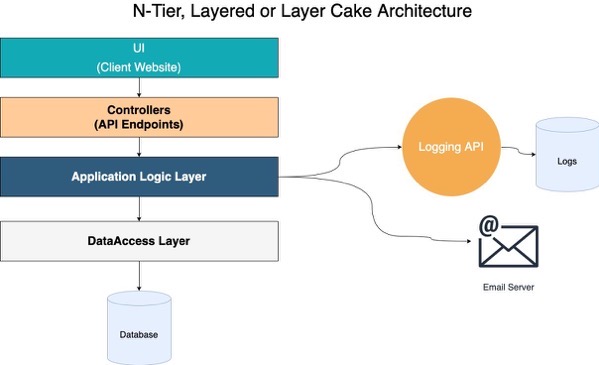
An example of N-Tier, which is common, but distinctly different from Hexagonal Architecture.
An example of N-Tier, which is common, but distinctly different from Hexagonal Architecture.
The above is very familiar to most developers I’ve worked with over the past 2o years. This has been the de facto architecture for most teams I’ve worked on. It is what Microsoft touted for years as being “THE” way to structure your applications, and therefore we followed like sheep.
Pros of N-Tier: The benefit of N-Tier Layered Architecture is that it is very simple to teach to new engineers and it was generally agreeable where business logic should go (although that tends to change from team to team).
Cons of N-Tier: Once your application is a bit larger and more complex, it becomes increasingly difficult to make small logic changes. A small change in one class will often require you to change the logic in many classes to handle your ‘little change’.
It Is Hexagonal

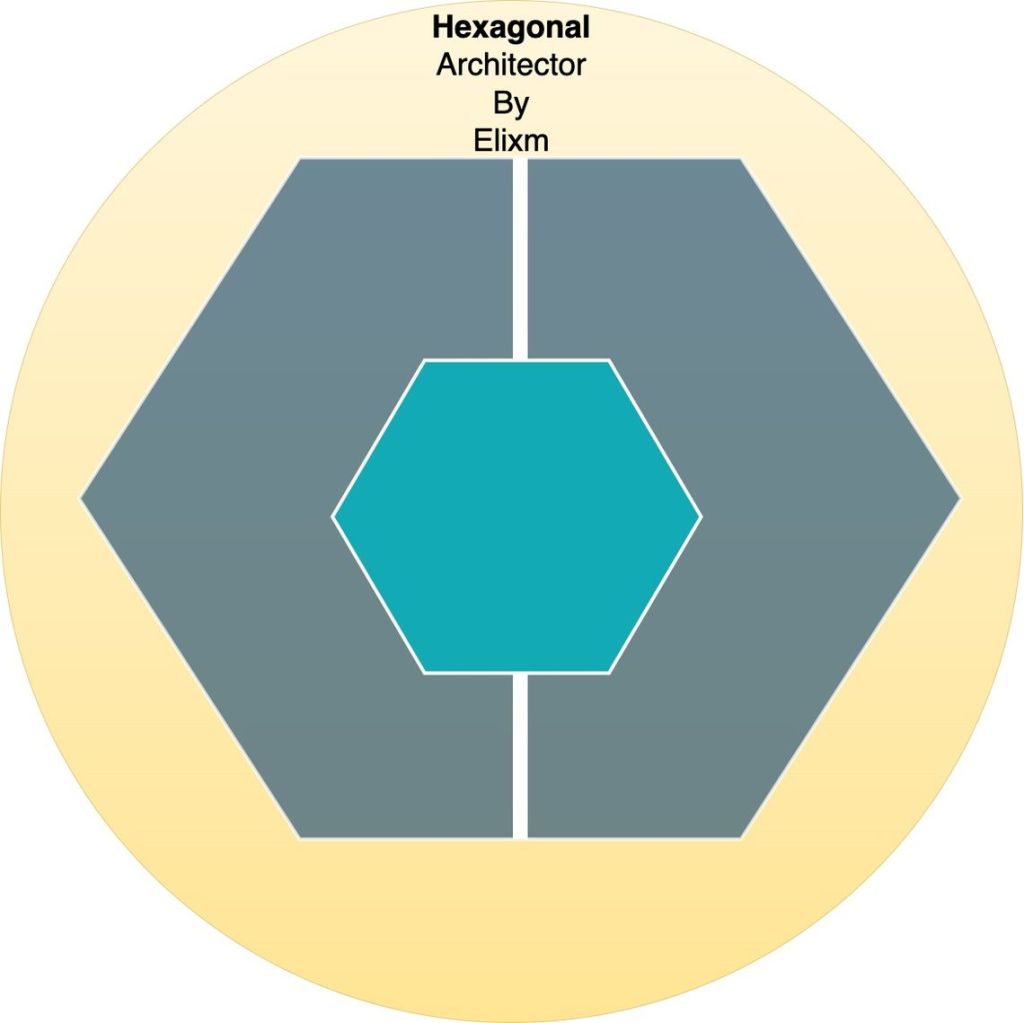
This type of image can be confusing. I find it confusing because I want to see the arrows point from the UI to the database, but they don’t. Instead, they all converge to the Domain in the middle of the image.
Let’s start with the center of the image. The Domain layer is at the core. Notice that all the dependency arrows are pointing in. Essentially everything is depending on the Domain Layer, and therefore the Domain Layer depends on nothing else.
That means the Domain doesn’t know about external services it could call. It doesn’t know anything about our database or our Logging system, or our mail server. That might seem like a problem, but look where the IRepositories, ILogger, and IMailer are. These interfaces are also defined in the Domain so we can program to the interfaces. At run-time, our encapsulating project can inject the implementations into the Domain.
The Domain Layer contains our Aggregates and our ValueObjects. Aggregates are classes that define business objects and encapsulate the business logic of those objects.
Aggregates vs Entities:
Aggregates are not a requirement for Hexagonal architecture, but since I’m showing them in the diagram, and because I strongly encourage their use, let me explain what they are.
There can be some confusion between Entities and Aggregates. Especially for .Net developers who are familiar with the EntityFramework entities being the main objects they work with. EF entities (.Net EntityFramework entities) are not Aggregates. EF entities are a collection of properties that represent a business object, but they lack the business logic.
It makes sense to create an Aggregate that has the same properties as an EF entity. You will then add the business logic to the Aggregate, and make the properties have private setters so that all changes to the Aggregate are made either through the constructor or through public methods. Those methods should contain business logic for validation and business rules.
Entity Example
public class Address: Entity // EF Entity
{
  public int Id {get;set;}
  public string Street {get;set;}
  public string City {get;set;}
  public string State {get;set;}
  public string PostalCode {get;set;}
}
public class Person: Entity // EF Entity
{
  public int Id {get;set;}
  public string FirstName {get;set;}
  public string LastName {get;set;}
  public int AddressId{get;set;}
}
The Entities do not contain any logic, therefore all logic must be handled by other classes. Conversely, the Aggregates contain all the logic needed to ensure that changing the values of the properties follow the business rules.
Aggregate Example (with same properties)
// Domain Layer
public class AddressAggregate
{
  public int Id {get; private set;}
  public string Street {get; private set;}
  public string City {get; private set;}
  public string State {get; private set;}
  public string PostalCode {get; private set;}
  // constructor
  public AddressAggregate(int id, string street, string city, string state, string postalCode)
  {
     Id = id;
     Street = street;
     City = city;
     State = state;
     PostalCode = postalCode;
   }
}

pubic class PersonAggregate
{
  public int Id {get; private set;}
  public string FirstName {get; private set;}
  public string LastName {get; private set;}
  public AddressAggregate Address {get; private set;}
  // constructor
  public PersonAggregate(int id, string firstName, string lastName, AddressAggregate address)
  {
    Id = id;
    FirstName = firstName;
    LastName = LastName;
    Address = address;
  }

  public void ChangeFirstName(string value)
  {
     if(value == "")
     {
       throw new Exception("Invalid FirstName");
     }
     firstName = FirstName;
  }

  public void ChangeLastName(string value)
  {
     if(value == "")
     {
       throw new Exception("Invalid LastName");
     }
     lastName = LastName;
  }

  public void ChangeAddress(AddressAggregate address)
  {
    int newAddressId = this.Address != null ? this.Address.Id : -1;

    this.Address = new AddressAggregate(newAddressId, street, city, state, postalCode);
  }
}
Notice the private setters in the Aggregates. We don’t allow outsiders to touch the properties directly.
At first glance, the Aggregate looks like much more work than using the EF entities, however, what we’re not seeing here is that if you don’t use Aggregates, then you end up putting all the validation logic in other places.
More about Aggregates:
Other things you should know about Aggregates:
Aggregates ALWAYS have an Id property. (see ValueObjects below. ValueObjects NEVER have an Id.)
Aggregates represent a transaction boundary. Meaning that when you save an Aggregate, you expect everything in the Aggregate to be saved in a transaction. In the example above, if we save the ‘PersonAggregate’ we expect it to commit changes to the Person and Address in a transaction because the address is in the PersonAggregate.
Aggregates allow for good OO design. Entities do not.
Infrastructure Layer:
The Infrastructure Layer is the back-end stuff. It connects our application to external services we depend on. This is where we implement the interfaces defined in the Domain. The Domain defined interfaces for repositories, without any care about what type of data-store is used. In the Infrastructure, we decide if our implementation will use MSSQL or Cosmos, or flat files.
We can also implement Loggers and Mailers here, and anything else that is defined in the Domain but not implemented there.

Application Layer:
Application Layer contains our Commands and CommandHandlers, as well as Requests and RequestsHandlers. We can put cross-cutting work here such as authorization. We can also put the logic here that spans across multiple Aggregates. Any logic that can be handled within a single aggregate should be handled within the aggregate. That will help you keep your code DRY (Don’t Repeat Yourself).
Suggestion for better CommandHandlers: Pass everything into your commandHandler (via the command) that it will need so the commandHandler will not make calls to other services. This will make your commandHandlers deterministic and will make your testing much simpler. If you find your commandHandler is needing to call out to get information it needs, then figure out how to obtain that information ahead of time and put it into your command. The one exception in my code is that I allow commandHandlers to load and save the aggregate it is working on.
Controllers in the API Layer:
The Controllers in the API project will depend on the Application Layer. They will construct Commands and then allow CommandHandlers to process those commands. The Controllers don’t know about Repositories or Databases, and they don’t need to. Their job is dead simple. Create a command, tell the commandHandler to handle it. Or create a request, and tell the requestHandler to handle it.
I hope that helps or was interesting.
More information regarding ValueObjects:
I mentioned ValueObjects above when I said that Aggregates ALWAYS have Ids. ValueObjects NEVER have Ids.
ValueObjects are a convention that allows us to make our code more OO.
ValueObjects are classes that do not have an Id. An address may be a ValueObject if it doesn’t have an Id. If it has an Id, then it is an Aggregate.
A birthdate would likely be a ValueObject. A PhoneNumber is another good example of a ValueObject.
// ValueObject example
public class PhoneNumber
{
    public string CountryCode{get;}
    public string AreaCode{get;}
    public string LocalNumber{get;}
    public string FullNumber {
      get
      {
         return "${CountryCode}-{AreaCode}-{LocalNumber}";
      }
    }

    // ctor
    public PhoneNumber(string countryCode, string areaCode, string localNumber)
    {
        if(!IsNullOrEmpty(countryCode) && countryCode.Length > 2)
          throw new Exception("Invalid countryCode.");

        if(IsNullOrEmpty(areaCode) || areaCode.Length != 3)
          throw new Exception("Invalid areaCode");

        if(IsNullOrEmpty(localNumber) || localNumber.Length != 7)
          throw new Exception("Invalid localNumber.");

        CountryCode = IsNullOrEmpty(countryCode) ? 1 : countryCode;
        AreaCode = areaCode;
        LocalNumber = localNumber;
    }
Important Features of ValueObjects to notice:
- Private setters
- No Id
- All validation in the constructor so you never have to check validity after it is created.
Once created, ValueObjects are not altered. If you want to change a PhoneNumber you will create a new class with the new properties and deallocate the old one.
In your ValueObjects all your property setters are private and the only function you need is a constructor. The constructor can house your validation logic. This ensures an invalid ValueObject can never be created. And since you can’t change properties, you don’t have to ever worry about testing its validity anywhere else.
 Elixm.com
Leave a comment